
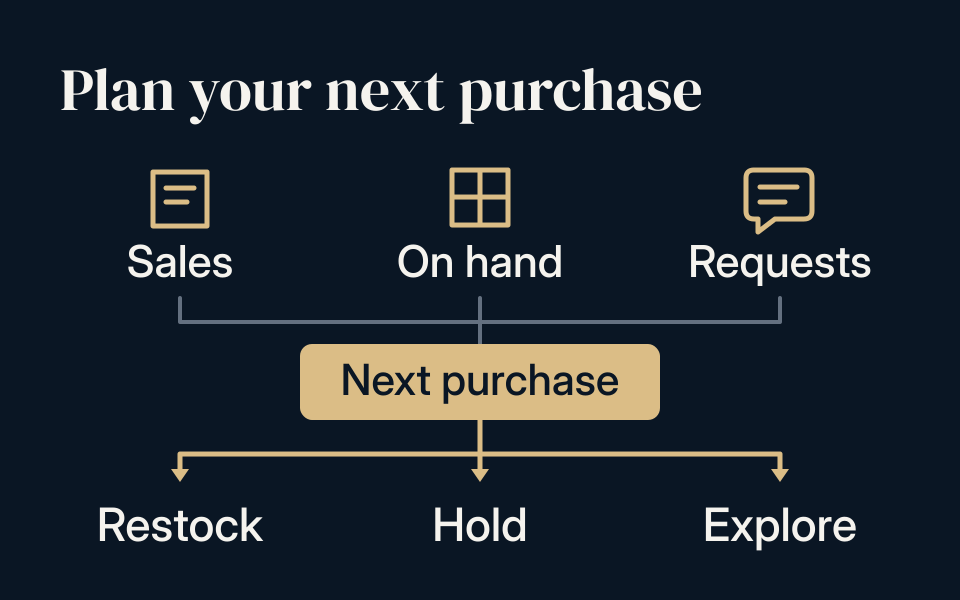
Before you buy
- Record sales and remaining stock by exact product, language and unit.
- Separate repeat demand from one-off sales and unanswered customer requests.
- Choose the next quantity, then confirm current supply and quote details.
Let the first order answer a buying question
A first order gives you more than a sales total. It shows which products customers chose, which needed explanation and which remain on the shelf. Your next purchase should reflect those differences.
Start by reviewing the sales channel you bought for. Did individual cards fill specific customer requests? Did sealed boxes sell unopened, or were they used for live openings? Keep those outcomes separate so a successful stream does not automatically become a reason to buy more unopened retail stock.
Review results by the way you sold
Keep the reason for the original purchase beside its results. A shop may need more of a shelf product while still holding a display item. A reseller may sell repeated copies of one reference steadily, while a show needs different cards next time. Avoid repeating the entire mix because one part sold.
Use the remaining stock and specific customer requests to propose the next quantities. Reconfirm the selected cards, composition or packaging and current supply before carrying an old quote into a new order.
Swipe or scroll sideways to see every column.
| Selling format | Useful restock evidence |
|---|---|
| Card or collectible shop | Display-product sales, showcase enquiries and remaining shelf boxes |
| Resale lots | Copies sold and remaining for each exact reference |
| Whatnot character auctions | Distinct cards sold, unsold cards and new character requests |
| Other live sessions | Results by segment, opening units used and unopened stock remaining |
Track the same item in the same unit
Use the product or card reference, language and edition as the starting point for each row. Separate different card conditions or packaging variants when they affect the way you sell the item.
For a CSV5C box, for example, record whether your sales were boxes or packs. If you opened boxes for a stream, record that conversion before comparing remaining stock with your purchase quantity. Use the verified packaging count for that product; do not assume a universal pack count.
Build a worksheet you can update
Keep one row per comparable product. Add the period you are reviewing so an item listed yesterday is not judged against one offered for several weeks. The worksheet can be a simple spreadsheet or a note you share with the person handling buying.
Swipe or scroll sideways to see every column.
| Record | What to enter |
|---|---|
| Product | Card or SKU reference, language, version and selling unit |
| Review period | When the item was available to your customers |
| Stock movement | Quantity received, sold, remaining and already ordered |
| Customer feedback | Repeat requests, questions and reasons given for passing |
| Next decision | Reorder, change the quantity, hold or investigate an alternative |
Separate demand from presentation problems
Repeated requests for a card you sold out of are useful to record. So are enquiries that never became purchases. Note the difference instead of counting every message as a sale.
When stock moves slowly, review the customer-facing listing before deciding what to buy next. Was the card language clear? Could buyers identify the edition and condition? For sealed products, was the pack or box quantity explained? Improving those details may help you understand the existing stock before adding more.
Give each product a next action
Choose a proposed quantity using sales during the review period, stock on hand, incoming orders and what you expect to offer next. Consider whether a completed sale came from a repeatable customer need or one unusually large purchase.
Use three simple actions: replenish a proven request, keep selling the stock you have, or test a different selection. If customers asked for a different card or edition, describe that requirement separately rather than treating any available substitute as equivalent.
- Replenish: identify what sold and the next quantity you want to discuss.
- Hold: record what remains and what you will improve or observe.
- Explore: list the new customer request and the product details still needed.
Turn the worksheet into a new enquiry
Send the selected product lines, requested quantities and destination, with any timing or condition requirements. Recheck availability, prices, packaging and delivery arrangements for this purchase; an earlier quote does not establish the terms of the next one.
At Legendary TCG Wholesale, you can discuss Simplified Chinese singles and sealed products, alongside Japanese singles, directly on WhatsApp. Share a partial restock list if that is what you have. Our assistant will help clarify the request, and current availability and pricing will be confirmed for your enquiry.
Review your own restock list
Record what you received, what sold and what remains in this blank CSV worksheet. Use your own sales period and figures.
Download restock worksheet